


The Problem
I’ve seen this happen over and over again.
One team designs clean layouts.
Another introduces new components.
Someone tweaks colors to “feel more modern.”
Accessibility gets checked at the end, if there’s time.
The result is usually familiar:
- Fragmented UI patterns across features.
- Opinion-driven debates that slow teams down.
- Design systems that work at 20 screens and fall apart at 100.
- Late rework when accessibility, brand, or technical limits collide.
The real issue isn’t skill.
It’s the lack of a shared method to translate research and strategy into visual systems.
This framework exists because I needed that method and couldn’t find it.
The Core Insight
I wanted demographics to work.
Age, gender, personas they would have made things easier.
They didn’t.
Across projects, they consistently failed to explain the decisions
that actually mattered:
- Layout density.
- Affordance level.
- Icon complexity.
- Interaction patterns.
What worked every single time I measured was context.
Once I stopped asking who users are and started asking how
they use the product, design decisions became clearer, faster,
and easier to defend.
Those behavioral patterns became the foundation for translating
research inputs into explicit visual decision rules.
This framework turns those inputs into systematic visual decisions.
Framework Overview
The framework is built around five interconnected dimensions.
Individually, each one informs design choices.
Together, they create clarity where there’s usually only opinion
and prevent what I’ve seen break teams: isolated screens,
endless debates, and systems that collapse at scale.
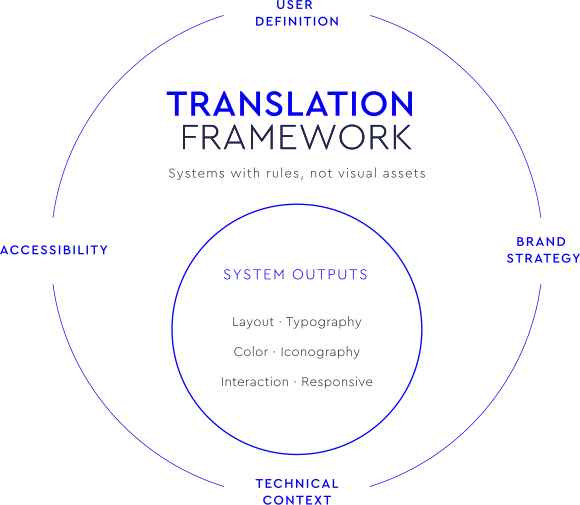
1. USER DEFINITION
How people actually use the product
The key shift: behaviors, not profiles.
Maps:
- Context of use → layout density.
- User goals → hierarchy and emphasis.
- Level of expertise → affordance.
- Frequency → icon familiarity.
Outputs:
- Layout structure.
- Interaction patterns.
- Component hierarchy.
- Icon strategy.
2. BRAND STRATEGY
How the product should be perceived
Brand isn’t decoration.
It’s an input.
Maps:
- Positioning → color strategy.
- Brand personality → typography tone.
- Differentiation → shape language.
Outputs:
- Color palette.
- Type scale.
- Component shapes.
- Visual tone.
3. TECHNICAL CONTEXT
What can realistically be built and maintained
Some designs fail not because they’re wrong,
but because they’re impossible.
Maps:
- Platform & devices → responsive behavior.
- Performance constraints → visual complexity.
- Input methods → interaction patterns.
Outputs:
- Grid system.
- Touch target specs.
- Performance guidelines.
4. ACCESSIBILITY
Who gets excluded if we’re not careful
The most expensive fixes I’ve seen came from treating accessibility as a final check.
Maps:
- Contrast requirements → color decisions.
- Navigation needs → keyboard & screen reader support.
- Cognitive load → labeling and patterns.
Outputs:
- Accessibility tokens.
- ARIA guidelines.
- Navigation rules.
5. SYSTEM OUTPUTS
What everything produces together
This is where integration happens.
Includes:
- Layout system.
- Typography scale.
- Color system.
- Iconography rules.
- Interaction patterns.
- Responsive behavior.

These are systems with rules not visual assets.

Framework in Practice
THE PROBLEM
The original ticketing kiosk was visually functional but not
behaviorally aligned with real users.
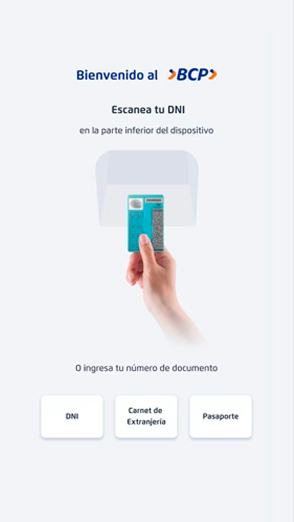
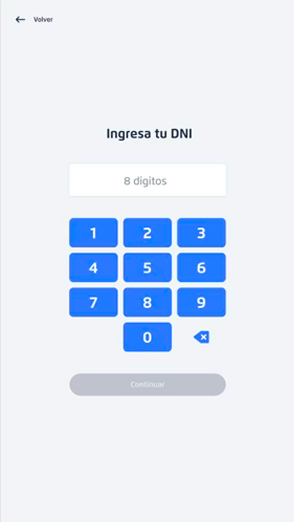
Despite being technically complete, the experience
required frequent staff assistance and created friction,
particularly for older adults and infrequent digital users.
Observed issues included
- Users hesitating before interaction.
- Dependence on branch staff to initiate tasks.
- Cognitive overload caused by unclear hierarchy and interaction cues.
- Low confidence during self-service processes.
Design decisions were primarily interface-driven
rather than behavior-driven.
The Approach: Framework Application
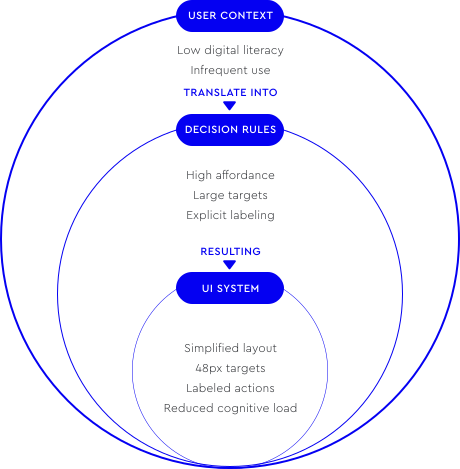
Using the framework, user research was translated into
explicit visual decision rules based on context rather
than demographics.
Key inputs:
- Broad age distribution with significant senior population.
- Low–medium digital literacy.
- Infrequent interaction patterns.
- High anxiety in financial environments.
These inputs informed system-level decisions:
- Increased spacing and simplified layout density.
- High-affordance interaction patterns.
- Clearly labeled actions and simplified iconography.
- Large touch targets (48×48px).
- High-contrast, calming visual hierarchy.
The goal shifted from aesthetic optimization to interaction
confidence and autonomy.
Applied in Real Product
Behavioral outcome: Increased user autonomy

The framework defines decision rules, validated in real products
through observable behavior.
In this case, the redesigned system
enabled a measurable behavioral shift from assisted interaction to
autonomous self-service.
Measured outcomes
- 69.79% of users completed the process entirely on their own.
- Staff assistance reduced to 20.54% of interactions.
- Only 9.67% required partial assistance during the flow.
- 87.08% of users chose direct manual input, confirming clarity of interaction patterns.
- Strong adoption among older adults, validating accessibility-driven decisions

Observed real interaction after redesign
Users independently completed the full self-service flow
without staff assistance, validating the framework’s
decision rules through observable behavior.
Impact
For users:
- Increased confidence and reduced anxiety.
- Accessible interaction across age groups.
- Faster task completion.
For operations:
- Reduced staff dependency.
- Lower onboarding friction.
- More scalable self-service adoption.
Key Insight
Without a translation layer between research and UI,
design decisions remain subjective.
When behavioral context becomes decision rules, usability
improvements emerge not as aesthetic changes but as
measurable human outcomes.
Self-Service Banking Kiosk
Research, redesign, and measurable impact
WHY THIS MATTERS
For Teams:
- Faster decisions.
- Shared vocabulary.
- Fewer subjective debates.
For Products:
- Visual coherence at scale.
- Accessibility built in.
- Clear brand expression.
For Organizations:
- Reduced rework.
- Easier onboarding.
- Systems that can evolve.
Impact is measured in decision quality,not pixels.
What I Learned
- The biggest design risk isn’t bad taste, it’s untested assumptions. Context beat demographics every single time I measured.
- Frameworks don’t replace judgment. They make trade-offs explicit and conversations better.
Limitations
Works best for:
- Products with clearly observable usage contexts.
- Teams building or scaling design systems.
Less effective for:
- Highly experimental work.
- Short-lived marketing sites.
- Early PMF exploration.
Why I’m Sharing This
This framework came out of years of designing and breaking design systems.
I’m sharing it as a contribution, not a prescription.
A tool meant to be adapted, challenged, and improved.
Good design knowledge grows when it’s shared.
Want the Full Framework?
You’ve seen the thinking behind it.
The complete guide gives you everything I use to apply it.
Includes:
- Detailed methodology & synthesis process.
- Two full case studies (Healthcare + Fintech).
- Figma + Notion application templates.
- Decision checklists & team exercises.


